
4 Features That Make Warden Production-Ready
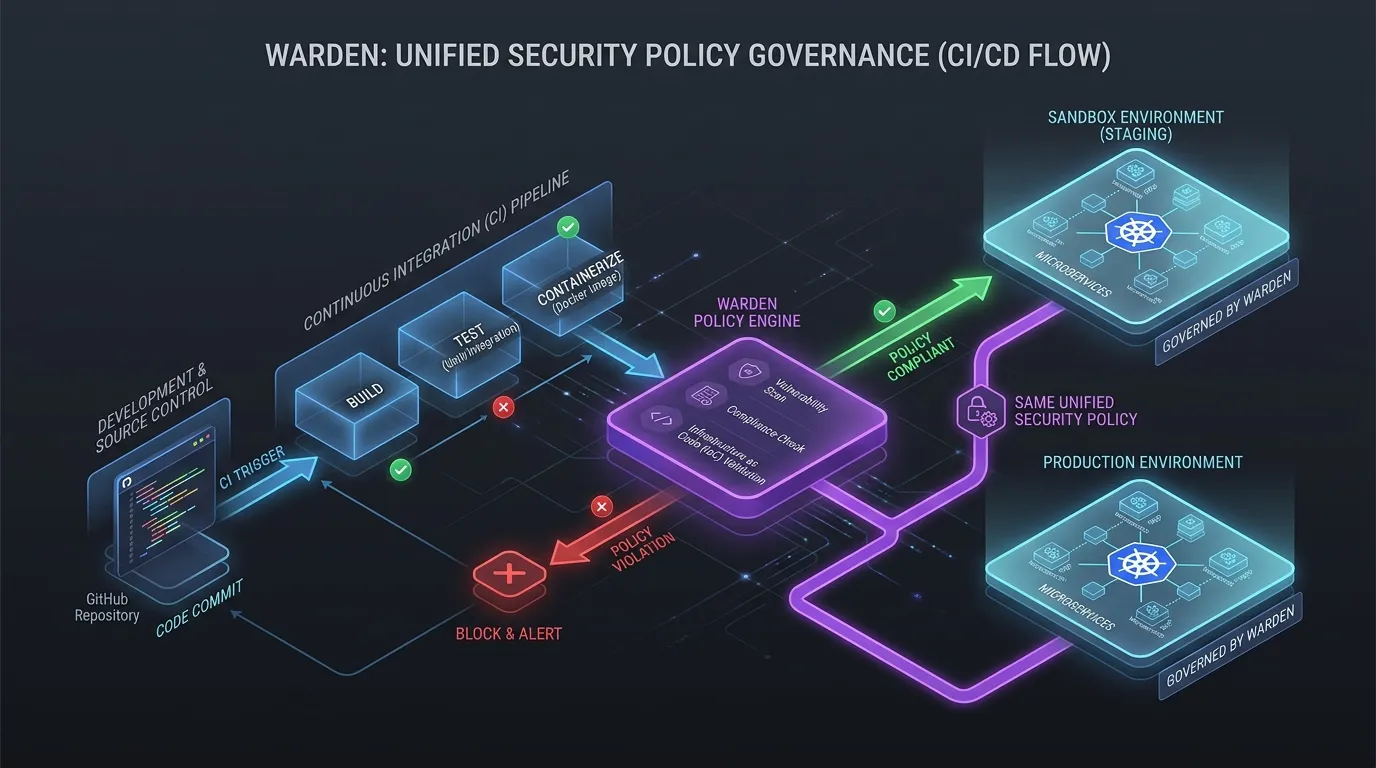
Warden started as a sandbox for MCP servers - one YAML policy, OS-native enforcement, deny-by-default. That was enough to prove the concept. It was not enough for production.
Production means your CI pipeline runs sandboxed. Your proxy filters traffic before it reaches the server. Your Kubernetes deployment carries the same policy as your local run. And your Windows users get the same guarantees as your Linux users - not a softer fallback.
Here are four features that made that happen.
1. CI/CD - GitHub Action
Your CI pipeline is the most dangerous execution environment in your stack. It has your secrets, your deploy tokens, your SSH keys. One compromised dependency can exfiltrate everything.
The Warden GitHub Action wraps your CI job in the same sandbox policy you use locally:
- uses: Prof-bilal/Warden/.github/actions/warden-action@main
  with:
    policy: .github/warden-policy.yaml
    command: npm test
The action builds Warden from source, applies the policy, and runs your command inside the sandbox. Filesystem access is scoped to granted paths. Network is blocked except for explicitly allowed hostnames. Environment variables are filtered - only named variables pass through.
This is not a container. This is OS-native enforcement applied to your existing CI job. Same policy file, same guarantees, different execution context.
What changed: Warden's own CI now runs attack simulations, escape tests, and unit tests under sandbox policies. If the sandbox breaks, CI fails - not production.
2. Client Proxy - JSON-RPC Filtering
MCP servers communicate over JSON-RPC. The protocol has no concept of "this tool call should be allowed" or "this response contains a secret." The client sends a request, the server sends a response, and nobody checks either direction.
warden proxy sits between the client and the server and filters both directions:
warden proxy --policy mcp-policy.yaml --upstream "stdio:npx @modelcontextprotocol/server-github"
Inbound filtering: tool call allowlists - only explicitly granted tools reach the server. Unknown tool calls are rejected at the proxy, before the server even sees them.
Outbound filtering: secret deny patterns, payload size caps - responses are scanned before they reach the client. Secrets matching deny patterns are redacted. Payloads exceeding the cap are truncated.
Audit: every allowed and denied JSON-RPC message is logged with timestamps, tool names, and decision rationale. The audit trail is the product - not a side effect.
The proxy supports both local stdio upstreams and remote HTTPS upstreams. For remote servers, the proxy bridges the connection through a loopback socket that WFP filters permit on Windows, and a Unix socket on Linux/macOS.
3. Kubernetes - Hardened Manifests from One Command
Running sandboxed locally is step one. Running sandboxed in production means your Kubernetes deployment carries the same policy - with NetworkPolicies, resource limits, and security contexts baked in.
warden k8s render --policy policy.yaml --image myapp:latest > deployment.yaml
warden k8s render reads your Warden policy and emits:
- Deployment manifest with
securityContext: { readOnlyRootFilesystem: true, allowPrivilegeEscalation: false }, resource limits derived fromlimits.memory_mbandlimits.timeout_s, and the sandboxed command. - NetworkPolicy that restricts egress to exactly the hostnames in
network.allow. Everything else is blocked at the network layer. - Service account with minimal permissions - no RBAC escalation.
There is also warden k8s validate which checks your policy against the manifest and catches misconfigurations before you deploy:
warden k8s validate --policy policy.yaml
# checks: command exists, image referenced, hostnames valid, limits sane
Same policy file. Local sandbox and Kubernetes deployment are two views of the same guarantee.
4. Windows - Four Layers, One Boundary
On Linux, bubblewrap does nearly everything. On Windows, the same guarantee needs four OS primitives working together:
AppContainer Token (LowBox): every sandboxed process runs under a token that denies all filesystem, network, and environment access by default. The token is the hard boundary - no syscall crosses it.
WFP Egress Filters: Windows Filtering Platform rules permit only the loopback proxy bridge and block every other outbound connection. DNS is denied by the token; TCP is denied by the filters.
Job Object Limits: wall-clock timeout, memory cap, and kill-on-close are enforced by the kernel. A runaway process is terminated with its entire tree - no orphaned children.
ETW Audit Trail: a private real-time trace session captures kernel file I/O events scoped to the sandbox tree. Every file access is logged, not guessed - the audit is the product.
Each layer requires its primitives to initialize, or the run is refused. That refusal is the feature: when the AppContainer backend cannot initialize without admin rights, Warden exits instead of running your server unprotected.
What ties them together
These four features share one design principle: the same YAML policy drives all of them.
command: ["node", "server.js"]
filesystem:
  read: ["./data"]
  write: ["./output"]
network:
  allow: ["api.github.com"]
env:
  allow: ["GITHUB_TOKEN"]
limits:
  memory_mb: 512
  timeout_s: 300
This file is your CI sandbox policy. Your proxy filter config. Your Kubernetes deployment source. Your Windows security boundary. One file, four enforcement points, zero drift between them.
That is what makes Warden production-ready: not that it sandboxes MCP servers, but that it sandboxes them everywhere - with the same policy, the same guarantees, and the same audit trail.
Try it
npm install -g warden-sandbox-cli

# See what your server actually touches
warden trace -- node your-server.js

# Generate a starter policy from the trace
warden init

# Run sandboxed
warden run --policy policy.yaml -- node server.js

# Check Kubernetes readiness
warden k8s validate --policy policy.yaml
The full compatibility matrix, escape test results, and policy examples are in the GitHub repo.
Written by Prof-bilal. Creator and maintainer of Warden, an open-source sandbox runtime for MCP servers working on OS-level sandboxing, policy enforcement, and developer tooling across Linux, macOS, and Windows.